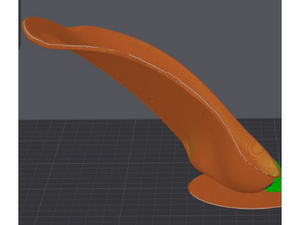
Stryde Print defaults to a recommended angle of 40°, which provides an optimal balance for the majority of orthotic geometries. However, depending on heel geometry and weight distribution of the orthotic, fine-tuning may be necessary.
Note: Depending on your part's geometry, Stryde Print may automatically calculate and lock the highest acceptable print angle to ensure enough contact with the bed. If you experience difficulties determining a print angle due to this restriction, please contact Support.
Understanding Print Angle
The print angle defines the orientation of the orthotic relative to the belt plane:
Higher Angles (60°–90°): The orthotic stands more upright (more vertical). This increases the center of mass. It requires less processing on the heel but provides less contact between the orthotic and the bed. This works well for heel-cup-heavy orthotics (e.g UCBL models).
Lower Angles (30°): The orthotic rests closer to the belt (more horizontal). This increases bed contact and lowers the center of mass. It reduces wobble but requires more post processing on the heel. This works better for top-heavy orthotics, and certain heel cup geometries as discussed below.
When to Adjust Your Print Angle
Evaluate your part against the following factors before slicing:
Heel Cup Curvature
- Orthotics with shallow or flat/thin heel cups could potentially peel off the bed.
- Decrease the print angle. Making the part more horizontal creates a larger contact area between the the orthotic (posterior heel and lower arch) and the bed, keeping the orthotic well adhered during printing.
Weight Distribution (Top-Heaviness)
- Orthotics which are top heavy (e.g. ear-foot postings, or thick proximal shells) could potentially tip over.
- Decrease the print angle (move closer to 30°–35°). Laying the part flatter increases the contact between the bed and the orthotic, keeping the orthotic more stable during printing.
Support Structure Requirements
Certain shell features or heel cups (e.g. ones which are deep or sharply curved) create a floating region during file generation. Enabling supports on Stryde Print creates support structures under them so that they are not printed in the air.